

RobHolt
Moderator
- Joined
- Oct 23, 2004
- Messages
- 4,126
- Reaction score
- 12
So you like iTunes on the mac but want access to a decent graphic or parametric EQ.
On the face of it you have two options. Use the standard iTunes EQ or use an external processor such as our very own, brilliant, high performance, stunning value Audiosmile DEQ2496
Ok, iTunes graphic EQ sucks because it is far too limited and can only apply coarse correction, and not everyone wants an external box. However, lurking within OSX are an array of excellent EQ plug-ins, provided so that both Apple and 3rd party audio applications can use them.
Why can't iTunes access them?
Good question but you'll need to ask Apple why they built probably their most widely used piece of software to use a different standard.
What you need is a host program running in the background and able to call on the various plug-ins. One of the better examples is Audio Hijack Pro from Rogue Amoeba http://www.rogueamoeba.com/audiohijackpro/
The Demo version is free but a licence is only £20 and it gives you a very useful range of functions in addition to allowing the use of EQ. Essentially, you run the software in monitor mode and 'insert' plug-ins as required. You can use as many as you wish for combined effects and the program will work with a variety of standards including the popular VST. There are some 25 standard Apple plug-ins and a host of others. While we are primarily interested in the EQ options, others exist to influence, for example, dynamics and image placement.
One particular add-on is apQualizr http://www.apulsoft.ch/apqualizr/ allowing a whole array of filters to be inserted and manipulated in real time with an impressive interface. Unfortunately it isn't a free app and will cost you £50 but you might find it good value given the functionality and interface.
Some screen shots:
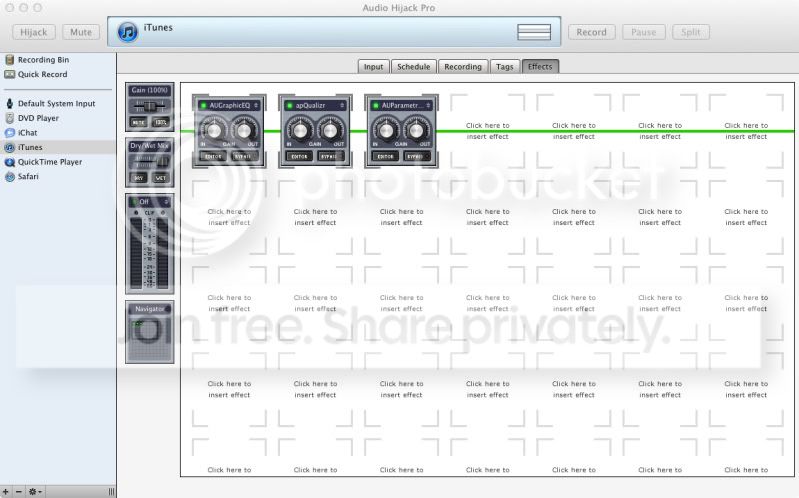
On firing up AHP you need to navigate to the effects window having selected the input source, in this case iTunes. You'll be presented with the page below and by clicking within any of the squared areas you'll bring up an effects menu. Select the effect you require and it auto inserts. Select the 'Editor' button to make any changes to the plugin.
Here I've got three running, Graphic EQ, Parametric EQ and apQualizr:
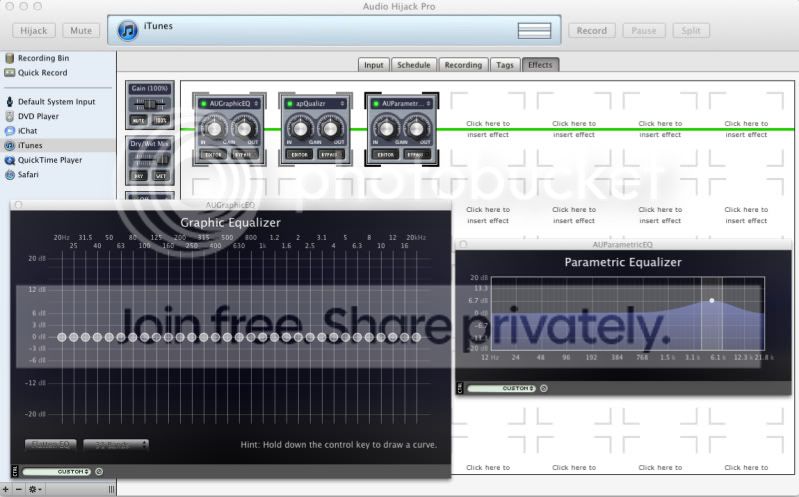
Once in edit mode, you'll see something like this. Here are the edit views for GEQ & PEQ:
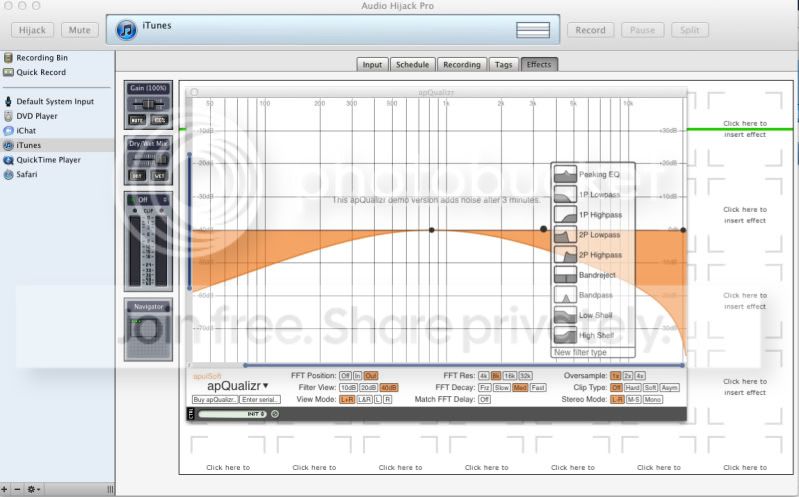
Lastly, here is the apQualizr edit screen and as you can see, a number of the most common filters are available as presets, though of course each can be fully edited.
So I hope that gives a taste of what you can do.
On the thorny subject of achieving bit perfect replay and the importance of such things, that will remain for the end user to decide, though clearly any software that digitally manipulates the source signal cannot by definition be bit perfect if you take the source file as the reference.
Our view is simply this. Studios and artists use such manipulation every day and the effects are multi-layered. They take the view that the end result justifies the means, i.e. you'd rather listen to a quality, balanced mix than a bunch of raw signal feeds committed to disc 'as is'.
You must make the same decision. You can go to any lengths you wish in order to achieve bit perfect playback, or you can make your own judgment call and determine that perhaps some EQ to counter room (or speaker) effects is a more desirable compromise. Depends on you and your particular situation, listening environment and attitude to such things.
Of course an effective and reliable means of measuring the audio system and room response is a very useful, though not essential adjunct to any EQ solution. Options for OSX are strictly limited but fortunately a cracking program exists in the form of FuzzMeasure Pro. More on that in part 2.
Doubtless there are alternatives to the solutions described here, so please post details of any that you've found to work well.
On the face of it you have two options. Use the standard iTunes EQ or use an external processor such as our very own, brilliant, high performance, stunning value Audiosmile DEQ2496
Ok, iTunes graphic EQ sucks because it is far too limited and can only apply coarse correction, and not everyone wants an external box. However, lurking within OSX are an array of excellent EQ plug-ins, provided so that both Apple and 3rd party audio applications can use them.
Why can't iTunes access them?
Good question but you'll need to ask Apple why they built probably their most widely used piece of software to use a different standard.
What you need is a host program running in the background and able to call on the various plug-ins. One of the better examples is Audio Hijack Pro from Rogue Amoeba http://www.rogueamoeba.com/audiohijackpro/
The Demo version is free but a licence is only £20 and it gives you a very useful range of functions in addition to allowing the use of EQ. Essentially, you run the software in monitor mode and 'insert' plug-ins as required. You can use as many as you wish for combined effects and the program will work with a variety of standards including the popular VST. There are some 25 standard Apple plug-ins and a host of others. While we are primarily interested in the EQ options, others exist to influence, for example, dynamics and image placement.
One particular add-on is apQualizr http://www.apulsoft.ch/apqualizr/ allowing a whole array of filters to be inserted and manipulated in real time with an impressive interface. Unfortunately it isn't a free app and will cost you £50 but you might find it good value given the functionality and interface.
Some screen shots:
On firing up AHP you need to navigate to the effects window having selected the input source, in this case iTunes. You'll be presented with the page below and by clicking within any of the squared areas you'll bring up an effects menu. Select the effect you require and it auto inserts. Select the 'Editor' button to make any changes to the plugin.
Here I've got three running, Graphic EQ, Parametric EQ and apQualizr:
Once in edit mode, you'll see something like this. Here are the edit views for GEQ & PEQ:
Lastly, here is the apQualizr edit screen and as you can see, a number of the most common filters are available as presets, though of course each can be fully edited.
So I hope that gives a taste of what you can do.
On the thorny subject of achieving bit perfect replay and the importance of such things, that will remain for the end user to decide, though clearly any software that digitally manipulates the source signal cannot by definition be bit perfect if you take the source file as the reference.
Our view is simply this. Studios and artists use such manipulation every day and the effects are multi-layered. They take the view that the end result justifies the means, i.e. you'd rather listen to a quality, balanced mix than a bunch of raw signal feeds committed to disc 'as is'.
You must make the same decision. You can go to any lengths you wish in order to achieve bit perfect playback, or you can make your own judgment call and determine that perhaps some EQ to counter room (or speaker) effects is a more desirable compromise. Depends on you and your particular situation, listening environment and attitude to such things.
Of course an effective and reliable means of measuring the audio system and room response is a very useful, though not essential adjunct to any EQ solution. Options for OSX are strictly limited but fortunately a cracking program exists in the form of FuzzMeasure Pro. More on that in part 2.
Doubtless there are alternatives to the solutions described here, so please post details of any that you've found to work well.
